1. Build a Product Enablement Hub (Inside Perplexity)
🛠️ Primary Tool: Perplexity Spaces
✏️ For: Product Marketing + Content Marketing
This isn't "build an AI chatbot." It's "stop letting people interpret your docs differently."
Here's the problem you're solving:
Your sales team is explaining your product five different ways. Your content sounds nothing like your messaging docs. And every new hire has to figure out "how we talk about things here.”
Here's the setup:
You create a Space that becomes the source of truth for your product and brand.
Upload your approved docs: positioning guides, competitive battlecards, customer stories, and messaging frameworks. Set custom instructions for terminology and voice. Define how it should answer buyer vs. user questions.
That Space now:
- Only pulls from your approved product and brand docs
- Answers in your voice, not generic AI tone
- Knows the difference between buyer vs. user questions
- Cites where answers come from
- Applies the same rules to both answers and content generation
What this looks like in practice:
Instead of: "Here's the deck, good luck."
Sales gets: "Ask the Space and get a ready-to-say answer that won't go off script."
Instead of: Fighting AI drafts that sound nothing like you.
Content gets: Outputs that already follow your messaging, terminology, and style.
Same Space. Same guardrails. Consistency in conversations and content.
The tactical part:
When you set up your Space, you're not just dumping files in. You're training it. Add these to your custom instructions:
- Voice guidelines: "Use 'customers' not 'users.' Write in second person. Keep sentences under 20 words."
- Positioning rules: "Always lead with the outcome (faster time-to-market), then the capability (real-time collaboration), then the feature (simultaneous editing)."
- Buyer vs. user distinctions: "For procurement questions, emphasize security and ROI. For end-user questions, focus on workflow improvements."
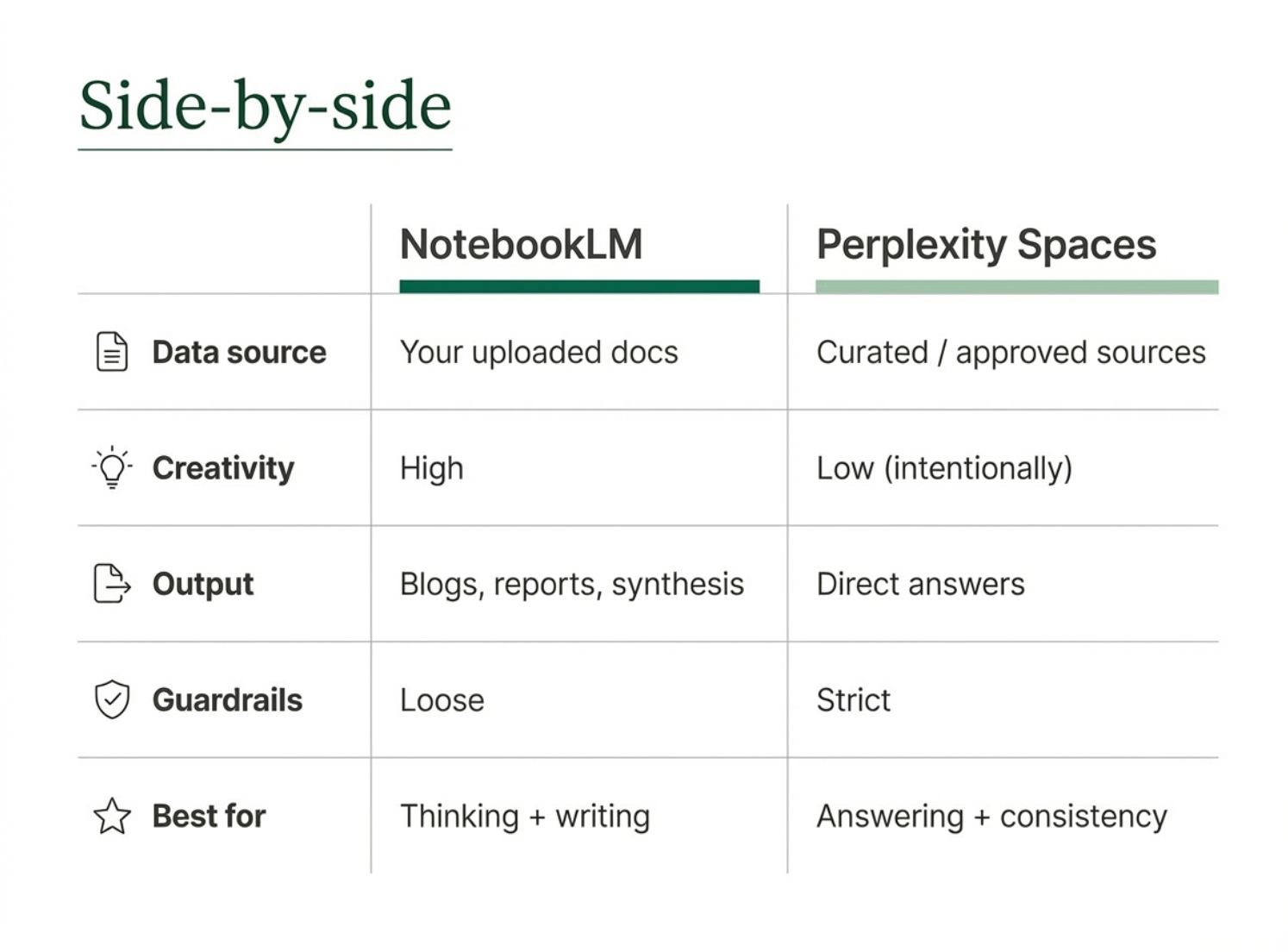
If you’ve been reading my newsletter for a while and trying these tools, you may ask yourself (like I did) “Isn’t Perplexity 'Spaces' just like NotebookLM?” I did some research and found: Deciding between the two or using both comes down to the priorities or outcome you need.
💡 For PMM / Sales teams (important)
- NotebookLM = internal brain for PMM, marketing, strategy
- Perplexity Spaces = frontline tool for sales, CS, partners
So if the question is:
- “Help me understand/connect/write/create/think through this” → NotebookLM
- “Based only on what we’ve approved, what should I say?” → Perplexity Spaces
2. Automate Competitive Intel
🛠️ Primary Tools: Perplexity Tasks + Perplexity Research
✏️ For: Product Marketing / Strategic Marketing
Set recurring tasks to track competitor launches, sentiment, and leadership changes. Use research agents to synthesize markets, partnerships, and overlaps in minutes instead of days.
The tactical workflow:
Step 1: Schedule a Task to run weekly competitive analysis
Example query: "Weekly competitive analysis of [competitor] product updates, customer sentiment, and leadership changes. Focus on: new feature announcements, pricing changes, customer reviews mentioning our category, executive moves."
It runs automatically. Delivers a report. You're not manually checking for updates every Monday.
Step 2: Use Perplexity Research for deep dives when something surfaces
Let's say the Task flags a competitor partnership. Use Research to pull: the full partnership announcement, analyst coverage, customer reaction on social, implications for your positioning.
Research reads hundreds of sources and delivers a clear, cited report. Not a list of links. An answer.
Why this matters:
This is the kind of thing that always falls off your to-do list because it's important but not urgent. Until it is urgent, and you're scrambling to prep a competitive deck for next week's board meeting.
Tasks remove the friction. The work happens whether you remember it or not.
3. Accelerate Campaign and Asset Production
🛠️ Primary Tool: Perplexity Labs
✏️ For: Content Marketing
Labs is the "creation studio." While other tools find information, Labs is designed to take your notes and build them into formatted deliverables like slide decks, images, and video content.
Examples that made this click for me:
- Raw notes → polished decks
Drop in rough strategy notes or an outline. Labs turns it into a board-ready deck with structure, headers, and action items.
- Dashboards without code
Generate things like win-loss analysis dashboards by region or lead gen dashboards for specific company criteria.
- Custom visuals and videos
Need a diagram, illustration, or training video? Labs can generate those without defaulting to stock imagery.
A practical use case:
You just finished a webinar. You've got the transcript, the Q&A, and some rough notes.
Normally, this becomes:
- A blog post (2 hours)
- Social snippets (30 minutes)
- An internal summary deck (1 hour)
With Labs:
- Drop the transcript into Labs
- Prompt: "Create a 5-slide summary deck highlighting the top 3 customer questions, 2 key takeaways, and next steps for sales."
- Review and edit the output (15 minutes)
This is where Labs goes beyond "AI wrote me some bullet points." It's building the actual thing you need to present, share, or ship.
4. Make Lead Gen and ABM Less Spammy
🛠️ Primary Tools: Comet (Agent Mode) + Perplexity Research
✏️ For: Demand Gen / Growth Marketing
Generate targeted company lists, personalized outreach tied to real business events, and win-loss dashboards that show why deals stall or close.
Here's where it gets interesting…
Comet has two modes:
- The Assistant: A sidebar that summarizes the page you're on
- The Agent: Takes control of your browser to execute complex workflows (finding flights, filling out forms, managing schedules)
For marketers, Agent mode can:
- Build prospect lists
- Pull company data
- Track real-time business signals (funding rounds, leadership changes, product launches) without you manually clicking through LinkedIn and Crunchbase
The tactical workflow:
Let's say you're targeting Series B companies in fintech that recently raised funding.
Old way:
- Manual LinkedIn and Crunchbase searches
- Export to spreadsheet
- Manually enrich with company data
- Cross-reference with your CRM
With Comet + Research:
- Agent mode builds the list based on your criteria
- Research synthesizes market overlaps and recent news
- You have a qualified, enriched list with context, not just contact info
Pair that with Perplexity Research to synthesize market overlaps and partnerships, and you've got ABM that's informed by what's happening right now, not last quarter's stale list.
5. Reduce Inbox Chaos (Without Adding Another Tool)
🛠️ Primary Tool: Email Assistant
✏️ For: Everyone (But Especially Demand Gen and Ops)
This one's simple but quietly powerful. Email Assistant integrates directly with Gmail and Outlook to:
- Smart Auto-Label emails into "To Respond," "FYI," and "Notifications"
- Schedule meetings by proposing time slots directly from email threads
- Draft replies that match your communication style
Why this matters:
It's not revolutionary. But it removes friction. And friction is what kills momentum.
You're not toggling between tools. You're not re-reading the same email three times trying to figure out if it needs a response. You're just...moving faster.
The practical benefit:
Let's say you get 50 emails a day. Of those:
- 10 need responses
- 20 are FYI
- 20 are notifications
Email Assistant auto-sorts them. You open your inbox and immediately know where to focus. That's 5–10 minutes saved per day. 30–60 hours per year.
Not life-changing on its own. But compounded with everything else? It adds up.
|


%20(6).png?upscale=true&upscale=true&name=Email%20Images%20(600%20x%20200%20px)%20(6).png)
.png?upscale=true&upscale=true&name=Header%20Email%20Images%20(1).png)